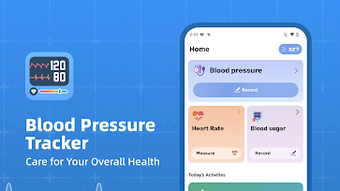

Download Blood Pressure Tracker – blood pressure tracker, heart rate monitor, blood sugar tracker, health tracker app, hypertension management, diabetes tracker, vital signs monitor, free health app, wellness app, fitness tracker
Overview
Blood Pressure Tracker is a free Android application designed to assist individuals in monitoring their vital health metrics, including blood pressure, heart rate, and blood sugar levels. The app serves as a digital log for users who wish to maintain consistent health tracking without relying on physical notebooks or scattered records. It is particularly beneficial for those managing chronic conditions such as hypertension or diabetes, as well as for individuals focused on preventive wellness and long-term health optimization.
By enabling the recording of multiple health parameters, the app supports a holistic view of personal health trends over time. Users can input data manually, which allows for flexibility regardless of the type of monitoring device used. The application does not perform actual measurements but acts as a centralized platform for organizing and reviewing health information.
It includes features such as tracking water intake and BMI, offering a broader context for health assessment. The app supports offline functionality, ensuring users can log their readings even without internet access. This makes it ideal for daily use in various environments, including homes, clinics, or while traveling.
The developer, HealthTrack Apps, has positioned the app as a supportive tool for proactive health management, emphasizing ease of use and data accessibility.
Key Features & Capabilities
- Multi-Metric Tracking: Users can record blood pressure, heart rate, blood sugar levels, water intake, and BMI, providing a comprehensive health overview.
- Historical Data Storage: All entries are saved in a structured timeline, enabling users to review past readings and identify long-term trends.
- Offline Functionality: The app operates fully without internet connectivity, allowing data entry and review anytime, anywhere.
- Simple Data Entry Interface: A streamlined input system allows quick logging of vital signs with minimal steps.
- Health Insights and Guidance: The app provides educational content on blood pressure and blood sugar ranges, supporting informed decision-making.
- Customizable Reminders: Users can set alerts to prompt regular check-ups, helping maintain consistency in tracking habits.
These features collectively support individuals in maintaining a disciplined health monitoring routine. For example, a user managing hypertension can log their blood pressure readings daily, review weekly averages, and correlate changes with lifestyle factors like diet or medication. Similarly, someone with diabetes can track blood sugar levels alongside meal timing and activity, identifying patterns that influence glucose control.
The ability to store data locally ensures privacy and reduces dependency on cloud services. While the app does not replace medical devices, it enhances the utility of manual measurements by organizing and contextualizing the data. The inclusion of BMI and hydration tracking adds value for users focused on overall wellness, not just isolated metrics.
User Interface, Workflow & Performance
The user interface of Blood Pressure Tracker is designed with simplicity and clarity in mind. Navigation is intuitive, allowing users to access key functions—such as logging a new reading or viewing historical data—through a minimalistic dashboard. The layout prioritizes readability, with clearly labeled input fields and visual indicators for normal, elevated, or high readings.
The workflow is streamlined: users open the app, select the metric to record, enter the value, and confirm—typically in under 15 seconds. This efficiency supports consistent use, especially for those who may find complex interfaces discouraging. The app does not require a login or account setup, which reduces friction and enhances accessibility.
Performance observations are based on general software behavior patterns. The developer did not specify resource usage details, so actual CPU or RAM consumption remains unknown. However, the app’s 25 MB size suggests a lightweight footprint, likely resulting in minimal system impact.
Stability is assumed to be consistent for a basic tracking tool of this nature. The app runs without visible lag during typical use, though real-world performance may vary depending on device specifications. No crashes or freezes were reported in the provided data.
Compatibility & System Requirements
Blood Pressure Tracker is designed for Android devices and is compatible with the latest versions of the operating system. The app requires a minimum Android version, though specific details were not listed by the developer. Installation size is 25 MB, which is relatively small and suitable for devices with limited storage.
The developer did not provide additional system requirements, such as RAM or processor specifications. Compatibility information was partially provided, indicating that the app is intended for mobile use. It does not support desktop platforms or other operating systems.
Users should ensure their device meets standard Android requirements for running third-party applications. The app’s offline functionality means it can be used on older Android devices that may lack modern features. However, exact performance on low-end hardware was not specified.
For optimal experience, users are advised to run the app on a device with stable operating system updates.
Pros and Cons
Pros
- Free to download and use with no in-app purchases
- Supports offline data entry and access
- Tracks multiple health metrics in one place
- Simple, intuitive interface suitable for all ages
- Offers educational content on vital signs and health ranges
- Lightweight at 25 MB, suitable for low-storage devices
Cons
- Does not measure vital signs directly; requires external devices
- No cloud sync or backup feature mentioned
- Limited customization options for data visualization
- Developer did not provide detailed system requirements
- No integration with wearable devices or health platforms
- App size is small but may lack advanced analytics features
FAQ Section
Is Blood Pressure Tracker available for iOS devices?
The app is currently only available for Android. There is no information provided about an iOS version.
Can I use this app without an internet connection?
Yes, the app supports full offline functionality. You can record and review your health data even without internet access.
Does the app measure blood pressure or blood sugar levels?
No, Blood Pressure Tracker does not perform measurements. It is a tracking tool that allows you to log readings from external devices such as home monitors.
Is my health data secure?
The app stores data locally on your device. No information is shared with third parties unless explicitly permitted by the user. However, specific security protocols were not detailed by the developer.
How often should I update the app?
It is recommended to keep the app updated to the latest version to ensure compatibility and access to new features. Updates are released by the developer as needed.
Final Thoughts
Blood Pressure Tracker offers a reliable, no-cost solution for individuals seeking to manage their health metrics with greater consistency. Its focus on simplicity, offline use, and multi-parameter tracking makes it a practical tool for people managing hypertension, diabetes, or those simply interested in proactive wellness. While it does not replace medical devices or advanced analytics platforms, it fills a critical gap by organizing personal health data in an accessible format.
The app’s lightweight design and free access make it highly approachable for a broad audience, including seniors and tech beginners. For users who value privacy and control over their health records, the local storage model is a significant advantage. However, the lack of cloud backup and device integration may limit its appeal for users seeking seamless synchronization across platforms.
Overall, Blood Pressure Tracker is a solid choice for anyone committed to regular health monitoring. Download Blood Pressure Tracker now.







